Text Dragon v2.2.1
Title: Text Dragon
Description: Text Dragon is a Windows application that runs in the background and allows you to drag and drop text from one application to the edit box of another application. You can also drag and drop text to a Windows explorer window, or the desktop to create a TXT, HTML or PDF file (keeping the formatting).Note: Not all applications work with Text Dragon but most should.
Please see the help file and video below for information on how to use Text Dragon
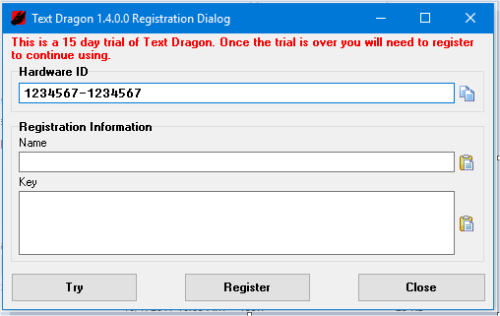
Text Dragon has a 15 day trial. After the trial it must be registered to continue use.
Text Dragon Help
To Register:
Registration keys are tied to a hardware ID on the system where you are going to be using Text Dragon. After you have purchased Text Dragon (via the PayPal link) send an email to TextDragon [at] vdsfreak.uu.me with the subject “Text Dragon Hardware ID” and your hardware ID in the body of the email. You will see your hardware ID on the registration dialog when you first start Text Dragon (see screen shot below).
Purchase: $15 USD + tax via PayPal 
Requirements:
Developed and tested on Windows 10. It has not been tested on any other Windows version, but it may work, give a try and
let me know. Java for pdf file support.
Features:
- Supports plain text files, HTML files, and PDF files.
- Should work with most windows applications.
- Screen capture image file formats: jpg, pcx, png, bmp, tga, gif and tif. (Multi monitors not supported at this time)
Video:
Text Dragon Video
Text Dragon
Screen Capture Video
Screen Shots: