
VDSFreak
Month
I fell upon this issue today and wanted to post how to fix it in case there are others having the same issue.
If you come across a help file (CHM) that when you open it, it is blank there is an easy fix.

Go to where the CHM file is, right click on it and choose Properties. On the General tab in the bottom right, there will be a check box (or a button depending on the version of your Windows OS) that says Unblock. Check (or press) that and then press OK.
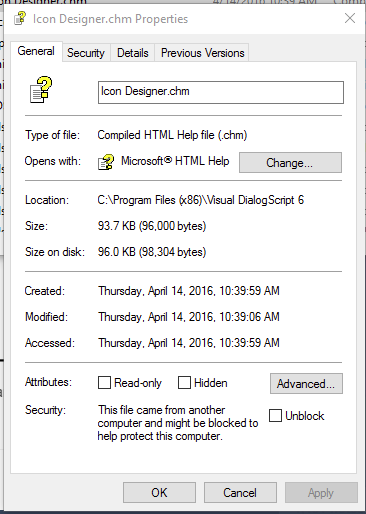
You will now be able to open the CHM file and see the contents.
version 1.3
A small app to change the icon of a folder on a Windows system. This was a request on Donationcoder.com.
The original post is here - http://www.donationcoder.com/forum/index.php?topic=42838.msg400775#msg400775
FREEWARE Download - https://cl.ly/2T0o0u1D0q08/download/FolderIconDrop.zip

Version History
1.3 - Added rebuild icon cache, added option to select what type icon index is used
1.2 - Fixed a few bugs
1.1 - Added ability to use icon index, added optional auto-close and auto-clear when pressing Go!
1.0 - Initial release
Updated MessagePop to version 2.0!! Added <timer_sec>, ok_button, you can set an icon for the message, and now all parameters can be passed at command line. Check it out!!